Google Review Management Software for Small Businesses
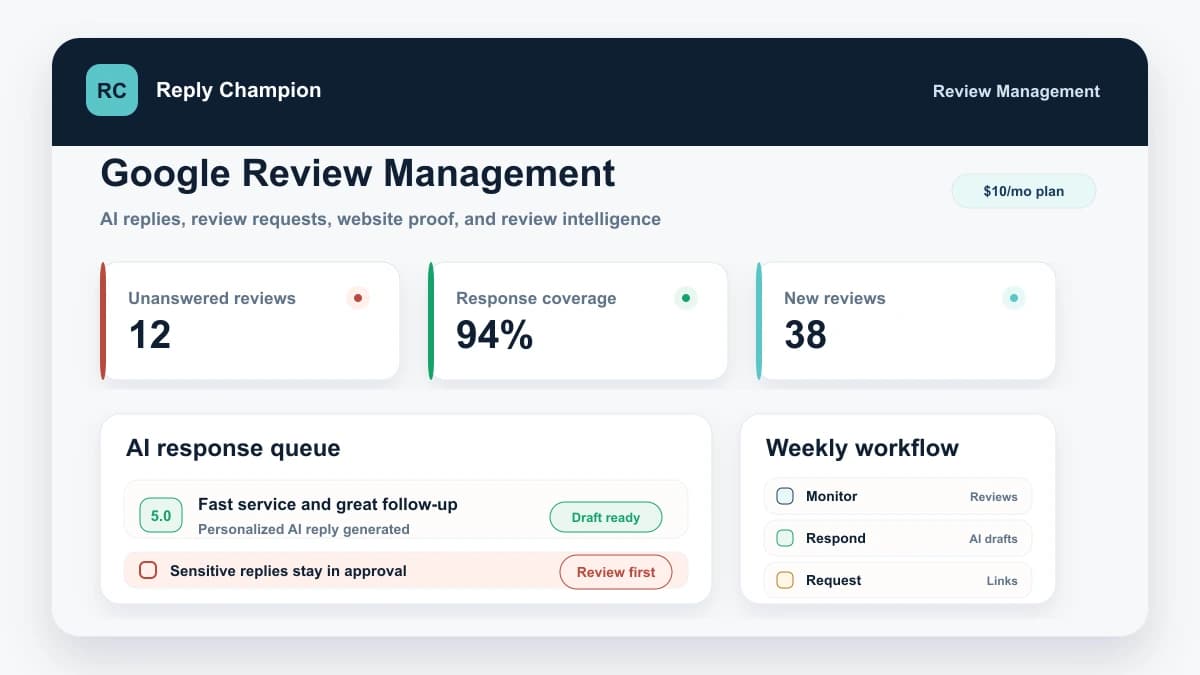
Connect your Google Business Profile, keep new reviews in one queue, draft specific replies, and approve anything sensitive before it posts. Reply Champion also handles honest review requests and a website review widget. It is built for teams whose main review channel is Google, with plans from $10/month.
7-day trial. No credit card. Use it with your own Google reviews.
See the workflow in practice: a Florida event center's review backlog and approval process.
$10/mo
Small Business plan
Covers 1-2 locations with AI replies, review requests, a Google reviews widget, analytics, safeguards, and 50+ languages.
$100/yr
Annual option
Annual billing saves $20/year for small teams, while month-to-month billing stays available.
7 days
Free trial
Test Reply Champion on real Google reviews with 10 trial AI responses and no credit card required.
No contract
Cancel anytime
Avoid long commitments when the job is simply managing Google reviews well.
What a Small Business Should Get Before Paying for a Bigger Suite
The highest-value review software jobs are not complicated. They are the jobs that happen every week: respond quickly, ask consistently, show proof on the website, and know which locations need attention.
Respond to Google reviews faster
Use review response software that drafts specific replies, keeps sensitive reviews in approval, and preserves response history.
Earn more honest reviews
Send review request campaigns with direct Google review links, private feedback paths, and one repeatable follow-up workflow.
Turn review proof into website trust
Embed Google reviews on service, location, booking, and pricing pages without paying for a separate widget subscription.
Keep the operating cost sane
Start with the Google review jobs a small business actually runs every week before paying for broad enterprise reputation software.
Review Management Software for Local Businesses Should Cover the Daily Work
A local business usually does not need a broad reputation suite first. It needs a repeatable Google review workflow the owner, office manager, service advisor, or GM can run every week: respond, ask, display, and measure.
Respond before prospects compare you
Use AI drafts, approval rules, and response history so the owner, office manager, or GM can keep Google reviews moving without starting from a blank page.
Small business review response software →Ask real customers at the right moment
Turn review requests into a weekly workflow with customer uploads, direct Google review links, one follow-up, and private feedback when someone needs help.
Review request campaigns →Build steady review velocity
Local businesses need a repeatable way to earn honest reviews from current customers instead of waiting for occasional word of mouth to show up online.
Review generation software for local business →Manage the Google profile that buyers check
Monitor new Google reviews, keep replies consistent, and track location-level issues from one dashboard tied to your Google Business Profile.
Google review management software →Keep the profile itself fresh
Use a simple GBP maintenance cadence for photos, posts, Q&A, reviews, and location reporting instead of treating the profile as a one-time setup.
Google Business Profile optimization guide →Put review proof where decisions happen
Show recent Google reviews on service pages, booking pages, landing pages, and location pages so website visitors see proof before they call.
Google reviews website widget →Match the workflow to the industry
Electricians, restaurants, dentists, med spas, and repair shops need different timing, examples, approval rules, and trust cues in their review workflow.
Google review management for electricians →Industry-specific Google review management guides
The daily workflow changes by business type. Use the closest guide for review request timing, approval rules, response examples, and Review Intelligence signals that match how customers actually choose.
Reviews about food, service, wait times, staff, and repeat visits.
Dentists →HIPAA-aware replies, patient confidence signals, and office friction.
Auto repair →Trust around honesty, pricing, turnaround time, and service advisors.
Car washes →Location-level reviews about wash quality, equipment, attendants, value, memberships, and vehicle concerns.
Salons →Service, stylist, consultation, appointment, price, and salon recovery themes.
Barbershops →Barber mentions, cut consistency, walk-in waits, appointments, atmosphere, and shop recovery.
Med spas →Privacy-aware approvals for treatment-sensitive feedback.
Insurance agencies →Policy, billing, claim, and office-level review workflows.
Self-storage →Facility-level proof around security, access, pricing, and staff.
Multi-location teams →Location reporting, consistent replies, and owner-level visibility.
Retail stores →Customer proof around service, selection, pickup, and support.
Which Review Management Page Should You Read?
This page covers the broader review management software category. If you are looking for a specific Google Business Profile workflow, AI reply drafting, or vendor comparisons, these pages go deeper.
Google review management
Best for managing Google reviews specifically: replies, industries, local SEO, and Google Business Profile workflows.
AI review responder
Best for the connected workflow: monitor Google reviews, draft AI replies, approve sensitive responses, and publish.
Google reviews widget
Best for adding Google reviews to your website with simple styling, automatic updates, and no separate widget subscription.
Why Review Management Software Matters
Online reviews directly impact whether customers choose your business or a competitor. Managing them manually is unsustainable, but the right review management tool makes it effortless.
Reviews also matter after AI discovery. Recent consumer search research found that most AI users take a verification step before acting, and review signals remain one of the major purchase-confidence factors after an AI recommendation.
Built around platform rules and buyer behavior
Review management software should not invent risky shortcuts. The workflow should match what Google allows, what customers expect, and what future buyers actually inspect before choosing a business.
Google local ranking guidance
Google says helpful replies can help a business stand out, and that more reviews and positive ratings can help local ranking.
Google review management guidance
Google explains that business replies are public, require verification, and show customers that the business values feedback.
Google review policy
Google allows genuine review requests but prohibits incentives, selective positive solicitation, pressure, and requested review content.
BrightLocal consumer review survey
BrightLocal provides current consumer behavior data on review reading, review responses, response speed, and asking for reviews.
Everything You Need for a Google-First Review Workflow
AI Review Responder
Reply Champion reads each review and drafts a personalized, on-brand AI response in seconds. Low-risk replies can move quickly, while negative or sensitive reviews stay in approval.
Multi-Location Dashboard
Monitor and manage reviews across all your business locations from a single dashboard. See star ratings, response rates, and trends at a glance.
Google Review Monitoring
Get notified when new Google reviews come in, see which ones still need replies, and keep every location active without checking Google Maps manually.
Review Request Campaigns
Send customers direct Google review links, collect private feedback when someone needs help, and track campaign opens, clicks, and review activity without selective solicitation.
Google Reviews Website Widget
Embed Google reviews on your website with a copy-paste widget. Choose a clean layout, theme, accent color, review count, minimum rating, and text-only filtering.
50+ Language Support
Automatically detect the language of incoming reviews and generate responses in the same language. Serve international customers without hiring translators.
Review Analytics
Track your review volume, average rating, response time, and sentiment trends over time. Identify patterns and measure the impact of your review strategy.
Review Response Software, Not a Managed Response Service
If you are searching for review response software, the job is usually practical: detect the new review, draft a reply that does not sound generic, keep risky reviews in approval, and publish without copying text between tools. Reply Champion handles that workflow for Google reviews.
A review response service can make sense if you want an outside agency to own the voice. Most small businesses are better served by software that gives them AI drafts, review monitoring, approval controls, and response history while the owner or manager stays in control of public customer communication.
What the software should cover
- Google review monitoring and notifications
- AI drafts from the actual review text and rating
- Approval rules for negative or sensitive replies
- One-click publishing from the review dashboard
- Response coverage and review health metrics
Review Management Software Buyer Scorecard
The best review management software is not the one with the longest feature list. It is the one that reliably handles the review jobs that affect calls, bookings, local trust, and conversion.
Google Business Profile connection
Does it connect to Google directly, sync real reviews, and publish approved replies without copy-paste?
Manual copy-paste tools are useful for occasional replies, but they do not solve the daily review workflow.
Google review management →Approval-aware AI replies
Can AI draft every response while routing negative, sensitive, legal, healthcare, refund, or safety reviews to approval?
The value is speed with control. Blind auto-posting creates brand and compliance risk.
AI review responder →Review request workflow
Can the tool ask real customers for honest reviews with direct links, tracking, and private feedback paths?
Review growth comes from consistent, policy-safe asking, not sporadic one-off emails.
Review request campaigns →Website conversion proof
Can recent Google reviews appear on service, location, booking, and pricing pages without another widget subscription?
Reviews should not only live on Google. They should support the pages where visitors decide to call or book.
Google reviews widget →Price discipline
Are you paying for the Google review workflow you need, or financing enterprise features you will not use?
For many small businesses, a focused $10/mo plan is easier to justify than a broad suite built around listings, SMS, surveys, and CRM.
Pricing →Multi-location governance
Can owners see response coverage, review volume, language, and location-level issues without logging into each profile?
A scattered workflow breaks as soon as a business has several locations, managers, or service lines.
Multi-location workflow →Policy and privacy guardrails
Does the product avoid incentives, selective solicitation, keyword stuffing, and public exposure of private facts?
Google allows honest review requests, but prohibits incentive-driven or selectively positive review programs.
Google review policy →Automation rollout plan
Can you start with AI drafts, controlled approvals, and location-specific rules before expanding auto-posting?
Review automation works best when the business earns confidence in the workflow before letting low-risk replies move faster.
Automation setup guide →Research your shortlist
Read the Review Before You Compare the Alternative
Start with what each platform actually covers, where it is stronger, what its pricing makes knowable, and who should still choose it. Then use the matching alternative page to decide whether Reply Champion's focused $10 workflow is enough for the review job you need done.
Reputation management and customer experience platform
Birdeye Review
Best for: Multi-location brands and teams that need broad reputation and customer-experience tooling
Read the evidence-led review →AI lead conversion, communications, and reputation platform
Podium Review
Best for: Local businesses that want reviews tied to texting, leads, inbox, phone, and payments
Read the evidence-led review →Review marketing, referrals, and repeat-business platform
NiceJob Review
Best for: Service businesses that want automated review collection and website social proof
Read the evidence-led review →Local SEO, listings, and reputation management platform
BrightLocal Review
Best for: Local SEO practitioners, agencies, and businesses that need rankings, listings, citations, and reviews
Read the evidence-led review →Multi-location digital presence, listings, and reputation platform
Yext Review
Best for: Multi-location brands managing listings and reviews across many publishers
Read the evidence-led review →Should you choose a focused Google review tool or a broad reputation suite?
This is the commercial decision most buyers are really making. Reply Champion is intentionally focused. That is a strength if Google reviews drive the business, and a limitation if you need a full enterprise marketing suite.
For a concrete example of that tradeoff, compare a broader customer-engagement platform with the focused Google review workflow in our Broadly alternative for Google review management.
Reply Champion is a strong fit if
- Google reviews are your main buying signal
- You want AI replies but still need approval controls
- You need review requests, replies, and website proof in one workflow
- You want a $10/mo starting price, a $100/year option, and no annual contract requirement
Choose a broader suite if
- You already have a full reputation team
- You need enterprise listings management across hundreds of directories
- You need SMS inbox, webchat, surveys, payments, and CRM features bundled together
- You need complex permissions and reporting across multiple brands
Wait or use free tools if
- You get only a few reviews per year
- You are not ready to ask customers consistently
- You only need one occasional reply draft
- You have not claimed or verified your Google Business Profile yet
Review Management for International Customers
A Google review workflow should handle more than English. Reply Champion detects the review language, drafts a same-language reply, and keeps the response inside your normal approval and posting flow. For the operational details, see the guide to responding to Google reviews in other languages.
Hotels, restaurants, and tourism
Reply to guests in Spanish, French, German, Portuguese, Japanese, Dutch, and more without switching tools.
International Google profiles
Capture the connected Google Business Profile country so reporting can show where active locations are based.
Language analytics
Track detected review language and generated response language so multilingual demand becomes measurable.
How It Works
Connect your Google Business Profile
Link your Google account in one click. Reply Champion syncs all your existing reviews and starts monitoring for new ones.
Review AI-generated responses
When a new review comes in, Reply Champion drafts a personalized response. Review it, edit if you want, and publish with one click.
Request more honest Google reviews
Send review request campaigns with direct Google review links, private feedback collection, and performance tracking so asking for reviews becomes a repeatable workflow.
Display reviews on your website
Add your best Google reviews to your homepage, service pages, and location pages with a simple website widget that updates as reviews sync.
Monitor across every location
Track reviews, ratings, and response rates across all your business locations from one dashboard. Filter by location, date, or sentiment.
Measure what’s working
Watch your average rating, response time, and sentiment trends improve over time with the analytics dashboard. Identify patterns and adjust.
Metrics your review management dashboard should make obvious
A serious review tool should create operational clarity, not just nicer replies. These are the numbers a small business should check monthly.
Response coverage
Percent of legitimate Google reviews with a thoughtful business reply.
Customers notice silence. Use this as the core health metric for the reply workflow.
Time to first reply
Median time from review posted to public response.
BrightLocal reports rising expectations for fast owner responses, with most consumers expecting a reply within a week.
Review velocity
New reviews per week, month, location, and campaign.
Recency and volume both shape customer trust, especially when prospects compare several local businesses.
Sensitive-review approval rate
Share of reviews routed to human review before publishing.
This shows whether automation is properly catching complaints, privacy-sensitive reviews, and operational risk.
Service and location themes
Review mentions by service, product, staff, language, and location.
The best review software should surface what customers actually praise or complain about.
Website proof coverage
Key service and location pages that include relevant Google review proof.
Review management should support conversions on your website, not only make the Google profile look active.
Who It's For
Single-Location Businesses
Restaurants, salons, dental offices, auto shops, and any local business that depends on Google reviews to attract customers.
Multi-Location Brands
Franchises, chains, and businesses with multiple locations that need a unified review management strategy across all sites.
Marketing Agencies
Agencies managing reviews for multiple clients who need a scalable, efficient workflow without logging into each client's Google account.
Healthcare Practices
Doctors, dentists, chiropractors, and therapists who need healthcare-aware review response safeguards and human approval before sensitive replies go live.
Which Type of Review Management Software Do You Need?
The best tool depends on whether you need a focused Google review workflow or a broad reputation suite. Here is the practical difference.
Reply Champion
Best for: Google-first businesses that want AI responses, review requests, and monitoring without enterprise pricing.
Strengths: Focused workflow, $10/mo starting price, $100/year option, 50+ languages, approval controls, no contracts.
Tradeoffs: Google-focused; not a full listings, SMS, survey, or CRM suite.
Enterprise reputation platforms
Best for: Larger teams that need listings management, surveys, SMS messaging, social media, and many review sites.
Strengths: Broad feature sets, multi-platform monitoring, enterprise controls.
Tradeoffs: Often higher-cost, demo-led, contract-based, and packed with features many small businesses never use.
ChatGPT or generic AI tools
Best for: Teams that only need occasional draft help and do not need a review dashboard.
Strengths: Flexible drafting and low direct software cost.
Tradeoffs: No Google integration, no monitoring, no one-click publishing, no history, no campaign workflow.
Manual templates
Best for: Very low review volume businesses with time to write and publish replies manually.
Strengths: Free and simple to start.
Tradeoffs: Slow, repetitive, easy to forget, and often too generic for negative or detailed reviews.
A $10/mo Google Review Workflow Instead of a Bloated Suite
Price is a feature when the business mainly needs Google review monitoring, AI replies, review requests, and website proof. Reply Champion keeps the workflow focused so small teams are not paying for listings, SMS, surveys, and CRM features they will not use.
How to evaluate review management software in 7 days
A trial should prove whether the workflow saves time and improves quality. Use the first week to test real reviews, real request campaigns, and real website proof instead of clicking around a demo account.
Day 1
Connect Google and sync reviews
Confirm the business profile, locations, historical reviews, languages, and response status are syncing correctly.
Day 2
Audit existing review gaps
Look for unanswered reviews, repeated negative themes, missing location coverage, stale reviews, and service lines with weak proof.
Day 3
Tune AI response rules
Set approval thresholds, brand tone, sensitive-review rules, and industry-specific reply preferences.
Day 4
Publish a controlled batch
Approve several AI drafts, compare them against manual replies, and confirm they sound specific rather than templated.
Day 5
Launch one review request campaign
Use real recent customers, direct Google review links, honest wording, and private feedback paths.
Day 6
Place review proof on the website
Embed recent Google reviews near homepage, service, location, and booking pages where they can help conversion.
Day 7
Decide from the dashboard
Check response coverage, time saved, review request performance, location gaps, and whether the workflow feels easy enough to keep.
Frequently Asked Questions
What is review management software?
What is the best review management software for small businesses?
What is the best Google review management software for small business?
What is the best review management software for local businesses?
What should Google review management software for small businesses include?
What features should review management software include?
Do I need reputation management software or Google review management software?
Is Reply Champion review response software or a review response service?
Is review response software different from review management software?
When should I choose an enterprise reputation management platform instead?
How much does Reply Champion cost?
Why is price a major factor when choosing review management software?
What do I get for $10/month?
Does Reply Champion work with Google reviews?
Does Reply Champion help me get more Google reviews?
Can I embed Google reviews on my website too?
Can one tool handle AI replies, review requests, and a Google reviews widget?
Can I manage multiple locations?
How does the AI review responder generate responses?
How does Reply Champion handle negative reviews?
How quickly should a business respond to reviews?
Does review management software help local SEO?
Is Reply Champion safe for healthcare businesses?
What is a Google review management tool?
Can I use AI to respond to reviews automatically?
Is there free review management software?
How is Reply Champion different from Birdeye or Podium?
Start Managing Google Reviews for $10/mo
Start with a 7-day trial. If the workflow earns its place, the Small Business plan is $10/month or $100/year, with no contract.
No credit card required - cancel anytime