Google Review Widget for Your Website
Embed Google reviews on WordPress, Shopify, Wix, Squarespace, Webflow, or any website page that accepts HTML. Copy one snippet, choose a clean style, and keep your review proof connected to the rest of your Google review workflow.
No credit card required
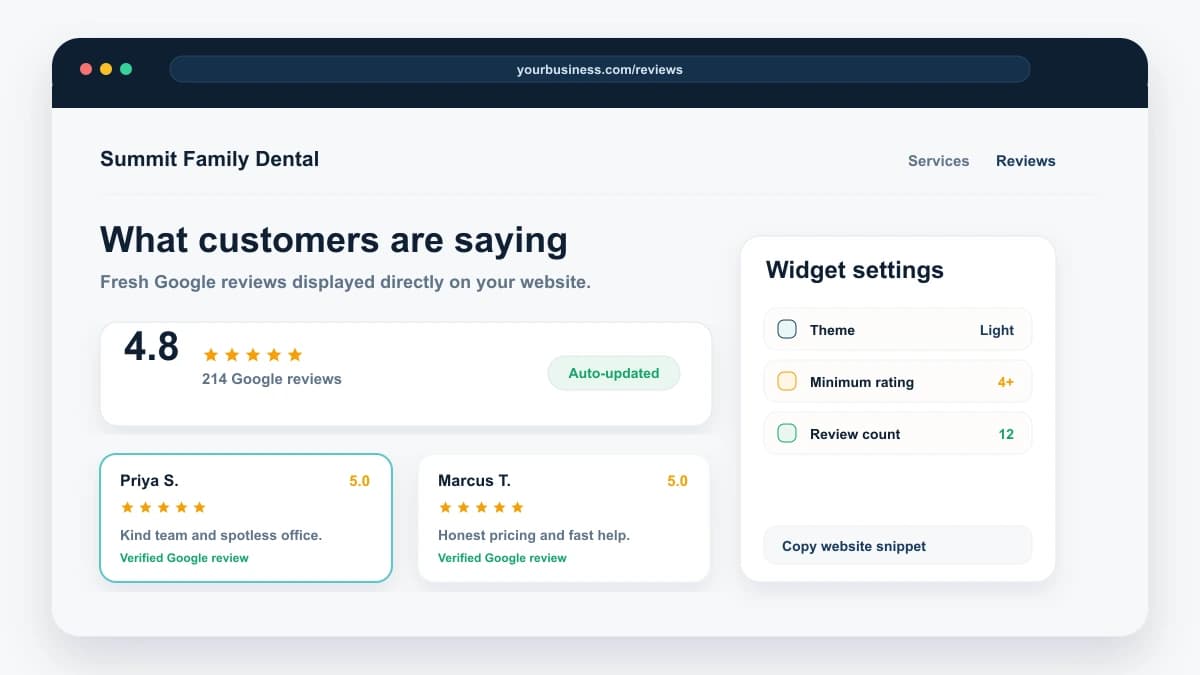
A Google review widget for your website pulls reviews from your Google Business Profile and displays them as clean, responsive review cards near the moments where visitors decide whether to call, book, or buy. Use it to embed Google reviews, display Google reviews on your website, and keep social proof current while Reply Champion also handles AI review responses, review request campaigns, and multi-language support. It works on WordPress, Shopify, Wix, Squarespace, Webflow, or any page that accepts HTML.
97%
Of consumers read online reviews for local businesses
BrightLocal 2026
81%
Use Google as their primary review source
BrightLocal 2025
120.3%
Conversion lift when shoppers interacted with ratings and reviews
PowerReviews ecommerce analysis
51.2%
Conversion lift when visitors encountered Q&A content
PowerReviews UGC analysis
The Problem with Standalone Review Widgets
Most businesses that want reviews on their site end up paying for a separate widget tool on top of whatever they already use to manage reviews. Here's the gap.
Your best reviews don't live where customers visit
Customers research you on your website. But for most businesses, their reviews are trapped on their Google Business Profile, invisible to anyone who lands on the homepage first. By the time a visitor thinks to check Google, they've already formed an impression of your site, with no social proof to back you up.
Standalone widget tools become another subscription
Many Google reviews widget tools solve only the display problem. If you also need to respond to reviews, request new reviews, and manage locations, you end up stacking a widget subscription on top of the rest of your review workflow.
Manual screenshots don't scale
Pasting review screenshots on your site means they're stale the moment a new review arrives, not verified by Google, and invisible to anyone who cares about authenticity. New review comes in, old screenshot stays up. It's a manual process that never ends.
Reply Champion vs. Standalone Google Review Widget Tools
Honest feature and pricing comparison of the Google reviews widget space. Pricing verified April 2026.
| Feature | Reply Champion | Elfsight | Trustindex | Shapo |
|---|---|---|---|---|
| Google Reviews Widget | ✓ | ✓ | ✓ | ✓ |
| Starting Price | $10/mo | $15/mo (Basic) | $5.42/mo (annual) | Free tier + paid |
| Free Tier | 7-day trial, then paid | 200 views/mo | No free plan | Yes (limited) |
| Auto-Updates from Google | ✓ | ✓ | ✓ | ✓ |
| AI Review Responses | ✓ | ✗ | ✗ | ✗ |
| Review Request Campaigns | ✓ | ✗ | ✗ | ✗ |
| Review Link + QR Toolkit | ✓ | ✗ | ✗ | ✗ |
| Google Review Analysis | ✓ | ✗ | ✗ | ✗ |
| HIPAA & Legal Ethics Safeguards | ✓ | ✗ | ✗ | ✗ |
| 50+ Language Auto-Detection | ✓ | Translation only | Limited | Limited |
| View Limits | None | 5K/mo on $15 plan | Unlimited on paid | Varies by plan |
| Works on Any Platform | ✓ | ✓ | ✓ | ✓ |
| Best For | Businesses that also want to manage and respond to reviews | Businesses wanting many widget types | Sites wanting 36 layouts | Free widget only |
What's Included in the Reply Champion Widget
Designed to be simple to install, easy to style, honest about what it shows, and hard to forget about once it is live.
Copy-Paste Embed
Copy one HTML snippet from your dashboard and paste it where you want reviews to appear. No npm package, no build step, no custom integration.
Auto-Updates from Google
New reviews appear on your site automatically as they sync from your Google Business Profile. No manual refresh, no republish, no CMS work. It just stays current.
Simple Display Controls
Choose grid, carousel, or list layout. Set light or dark theme, accent color, review count, minimum rating, and whether to show only reviews with text.
Responsive by Default
The embed adapts to its container so it looks right on mobile, tablet, desktop, homepages, service pages, and location pages without extra CSS.
Works Everywhere
WordPress, Shopify, Wix, Squarespace, Webflow, or custom HTML. If your platform allows an iframe and a tiny script, the widget works.
Built for Location Pages
Each connected Google Business Profile can have its own widget snippet, so multi-location teams can show the right reviews on the right location page.
Bundled, Not Added-On
The widget is available during your free trial and stays active on paid Reply Champion plans. No separate widget subscription and no per-view cap.
Works With Your Review Workflow
The widget lives beside review requests, AI replies, analysis, and response history, so you are not paying one tool to show reviews and another to manage them.
Who Should Use the Reply Champion Widget?
Best For
- ✓Small businesses already managing Google reviews who want to stop paying extra for a widget
- ✓Service businesses (HVAC, dental, legal, beauty, restaurants) with strong local reputation
- ✓Businesses that want social proof on their homepage, landing pages, and pricing page
- ✓Multi-location businesses that want one snippet per business
- ✓Owners who'd rather pay for one tool than stitch together a widget plus review manager plus campaign tool
Not Ideal For
- ✗Businesses that primarily care about Yelp, TripAdvisor, or Facebook reviews (we’re Google-only today)
- ✗Businesses wanting heavy theme customization with 30+ widget layouts (consider Trustindex or Elfsight Premium)
- ✗Businesses that only want a free-forever widget and don’t need review management
What Should a Google Review Widget Do for a Small Business Website?
A useful Google review widget should do more than decorate a testimonials page. It should show credible review proof on the pages where trust affects action, stay current without manual screenshots, and connect back to the same review workflow that helps the business respond to reviews and request new ones.
Show proof near the decision
Place reviews beside service copy, booking forms, quote forms, location pages, pricing sections, and contact pages.
Stay current from Google
Use synced Google Business Profile reviews instead of pasted screenshots, edited quotes, or stale testimonial blocks.
Support the full review workflow
The best fit for Reply Champion is a business that wants review display plus AI replies, review requests, direct links, and review analysis in one place.
How to Add Google Reviews to a Website
The fastest way to add Google reviews to a website is to connect your Google Business Profile, choose the reviews and layout you want to show, copy the embed snippet, and paste it into the page where visitors are deciding whether to call, book, or buy. The widget should support a real conversion moment, not sit on a forgotten testimonials page.
Connect the real Google profile
Use synced Google Business Profile reviews so the widget reflects public customer feedback instead of pasted screenshots or edited quotes.
Choose a simple display
Pick grid, carousel, or list layout; set the review count; and filter for reviews with useful text when the page needs stronger proof.
Paste near the decision
Place the snippet near service copy, booking forms, quote forms, pricing sections, and location pages where trust affects action.
How to Embed Google Reviews on WordPress
For WordPress, paste the Reply Champion widget snippet into a Custom HTML block, reusable block, Elementor HTML widget, Divi code module, or theme builder section. This gives you a Google reviews widget for WordPress without adding another plugin just to show reviews.
Homepage and service pages
Use the widget near high-intent calls to action, not only at the bottom of a testimonials page.
Elementor, Divi, and block themes
Any builder that supports custom HTML can render the widget snippet.
Avoid plugin bloat
Keep review display inside the same tool that handles AI replies, review requests, and Google review analysis.
How to Embed Google Reviews on Shopify
For Shopify, add the widget snippet to a custom Liquid section, theme block, homepage module, page template, or contact page. It works especially well for local service stores, appointment-based businesses, and brands that sell online but still depend on Google reviews for local trust.
Local service stores
Show Google reviews on quote, booking, consultation, and store-location pages.
No review-app confusion
Product review apps handle product reviews. This widget is for Google Business Profile reviews.
Wix, Squarespace, and Webflow Google Reviews Widget Setup
Wix, Squarespace, and Webflow all support embedded code in the right site sections or paid plan tiers. Paste the snippet where the review proof supports a decision: above a booking form, beside service copy, below a location intro, or near a quote request.
Wix
Use an Embed HTML element and place it inside the page section where reviews should appear.
Squarespace
Use a Code block on the page, footer area, or landing page section that needs social proof.
Webflow
Use an Embed element inside the section, grid, or CMS template where the widget belongs.
Free Google Reviews Widget vs Paid Widget vs Bundled Review Workflow
A free Google reviews widget can be enough for a tiny site that only needs a few reviews and can tolerate branding, view limits, or limited controls. A paid widget makes more sense when review proof affects revenue. A bundled review workflow makes the most sense when the same business also needs to ask for honest reviews, analyze review health, respond with AI, and show the best proof on its site.
Use free-only widgets for tiny sites
If you need only a basic embed and do not manage reviews often, a limited free widget may be fine.
Use Reply Champion when reviews are part of growth
Reply Champion is stronger when you want review display, review requests, AI replies, and analysis in one workflow.
Elfsight Alternative and Trustindex Alternative for Google Reviews
Elfsight and Trustindex are strong standalone widget tools. Reply Champion is different: the widget is bundled with the rest of the Google review workflow. That makes it a better fit when the goal is not only to display reviews, but also to generate more reviews and respond to them faster.
Choose a standalone widget for design variety
If you need many niche layouts and visual templates, a widget-only product may be the better match.
Choose Reply Champion for workflow value
If you want the widget plus AI replies, review requests, and review analysis, Reply Champion gives you more useful work per subscription.
Where Should You Place a Google Reviews Widget?
The best places to display Google reviews are the pages where visitors are close to action. Add the widget to the homepage, core service pages, location pages, pricing pages, quote forms, booking pages, contact pages, and landing pages where trust is a conversion blocker.
Homepage
Place reviews near the first major call to action or directly after the core offer.
Service and location pages
Use reviews to support the exact service or market a visitor is considering.
Pricing and quote pages
Put reviews close to cost, quote, financing, consultation, or booking sections where buyers are weighing risk.
Contact and booking pages
Add reviews where the visitor is deciding whether to call, book, or request a quote.
Best Google Reviews Widget for Small Business Websites
The best Google reviews widget for a small business is the one that is easy to install, stays current, looks credible on mobile, and does not create another disconnected subscription. For a business that depends on Google reviews, the widget is more valuable when it connects to the same workflow used to respond to reviews and request new ones.
Use standalone widgets for design variety
If the only job is visual customization, a widget-first product with many templates may be a better fit.
Use Reply Champion for Google-first operators
If reviews are part of weekly operations, keep the widget beside AI replies, review requests, analysis, and location reporting.
Do Embedded Google Reviews Help SEO?
Embedded Google reviews are mainly a conversion and trust asset. They can support the page experience for human visitors, but they should not be treated as a shortcut for rankings or review-star rich results. Because most widgets load through an iframe or script, Google may not treat the review text as normal page content. Google also says self-serving review markup for LocalBusiness or Organization pages is not eligible for review-star rich results, so do not add aggregateRating schema to your own business page just because a widget is present.
Use the widget for trust
Reviews on the page can improve confidence and conversion even when the review text is not fully indexable.
Do not abuse review schema
Avoid adding self-serving review or aggregateRating markup to chase stars for your own business. Use structured data only where it fits Google search guidelines.
Use page copy for rankings
Answer search intent with normal page content around the widget: service details, location proof, customer objections, FAQs, and original examples.
Frequently Asked Questions
What is a Google reviews widget?
How do I embed Google reviews on my website?
Can I add Google reviews to my website for free?
Is the Google reviews widget free with Reply Champion?
Which reviews will display on my widget?
Do reviews update automatically?
Does this work on WordPress, Shopify, Squarespace, Wix, or Webflow?
What is the best Google reviews widget for WordPress?
Can I embed Google reviews on Shopify without an app?
Is Reply Champion an Elfsight alternative?
What is the difference between a Google reviews widget and review management software?
Where should I place a Google reviews widget?
Is the widget good for SEO?
What happens to my widget if my subscription ends?
Can I customize the Google reviews widget?
Can I embed reviews from multiple Google Business Profiles?
Start Showing Your Reviews Where Customers Can See Them
Add your best Google reviews to your website in under a minute. Try it on your real site during the 7-day trial, then keep it live with a paid Reply Champion plan.
No credit card required