Automated review request software for Google reviews
Ask real customers for honest Google reviews with a review request tool that includes personalized email campaigns, direct Google review links, QR codes, SMS copy, private feedback collection, follow-ups, and campaign tracking. Build a consistent review request workflow for $10/mo.
No credit card required
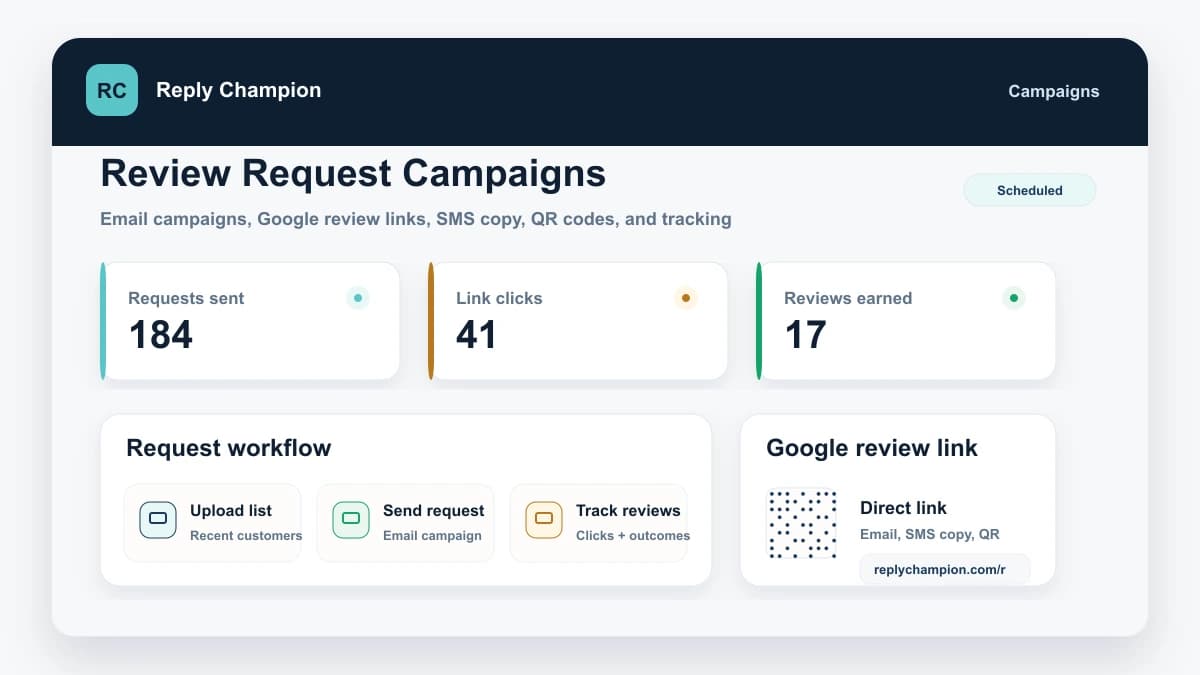
Use review request software when a link or template is not enough
Buyers looking for review request software are not only looking for wording. They want the workflow that sends, tracks, and improves every ask.
Manual review request emails
Replaces: Copying the same message into Gmail, forgetting follow-ups, and losing track of who was asked.
Reply Champion: Upload customers, send personalized review requests, reuse approved templates, and track sends, opens, clicks, private feedback, and Google redirects.
A bare Google review link
Replaces: Having the right link but no campaign timing, QR assets, private feedback path, or reporting around it.
Reply Champion: Keep the Google review link inside a full request workflow with QR codes, email/SMS copy, printable signs, and analytics.
Enterprise reputation suites
Replaces: Paying for listings, webchat, payments, surveys, and social tools when the urgent job is getting more honest Google reviews.
Reply Champion: Use a focused Google review request workflow with AI replies and review monitoring included, starting at $10/month.
Your Review Request Tool Starts With a Google Review Link and QR Toolkit
Review campaigns work better when every channel points to the same low-friction review destination. Reply Champion keeps your Google review link, QR code, manual SMS copy, manual email copy, and printable sign together in one dashboard.
Campaign link
Use the same Google review destination in every scheduled email campaign.
QR code
Download a Google review QR code for printed signs, receipts, invoices, and front-desk materials.
SMS request copy
Copy a short text-message request with a clean handoff link that opens the Google review flow.
Email request
Copy a simple review request for manual follow-up when a full campaign is not needed.
How Review Request Campaigns Work
Upload your customer list
Import customer names and email addresses from a CSV or add recipients manually to the campaign.
Send personalized review requests
Customize your review request email with your business name and direct Google review path. Use the built-in SMS copy when texting the link manually fits the customer relationship.
Use your Google review link and QR toolkit
Reply Champion keeps your connected Google review link ready for campaigns, SMS copy, email copy, QR codes, and printable signs.
Track results in your dashboard
See how many requests were sent, opened, clicked, and redirected recipients to your Google review page. A redirect confirms that the page opened, not that Google published a review.
Ask for Reviews the Right Way
Review request campaigns work best when they are consistent, honest, and easy for customers to complete.
If you are still choosing the wording, start with our review request email templates. Campaigns are the next step: sending the right version at the right time without remembering every follow-up manually.
Ask real customers consistently
Use campaigns after completed visits, jobs, appointments, or purchases so reviews come from genuine customer experiences.
Ask for an honest review
Do not ask for a specific rating. The best prompt is simple: ask customers to share their honest experience.
Avoid incentives
Do not offer discounts, gift cards, entries, or rewards in exchange for reviews. Keep the request clean.
Use private feedback for service recovery
Private feedback gives customers a direct support path. It should help you fix issues, not hide public review options.
Feedback-First Review Requests
Make it easy for customers to leave honest Google reviews while giving anyone with concerns a direct way to reach your team.
Direct Google Review Link
Every campaign can include your direct Google review link, so customers do not have to search for your business or figure out where to leave feedback.
Private Feedback Channel
Customers who need help can contact you privately from the same campaign flow. That gives your team a clear way to understand concerns and resolve issues directly.
The result: a cleaner review request workflow: ask real customers for honest reviews, reduce friction with a direct Google link, and collect private feedback when customers need help.
Why Review Requests Matter for Local Businesses
Recent, authentic Google reviews help customers decide whether to call, book, or visit. Review volume, quality, recency, and owner engagement all shape the way a Google Business Profile feels to a potential customer.
Campaigns do not guarantee rankings, and they should not be treated as a shortcut. They create consistency: every eligible customer gets a clear, low-friction way to share an honest review.
For the broader workflow, see our Google review management guide and the connected AI review responder that drafts replies after new reviews come in. For request scripts, use our guide on how to ask for Google reviews.
Why Businesses Use Review Request Campaigns
Get More Google Reviews
Many satisfied customers never think to leave a review unless you ask. A simple, well-timed request plus a direct Google review link makes honest reviews part of your normal customer follow-up.
Catch Service Issues Early
Give customers a direct support path when something needs attention. You can resolve issues faster while still asking real customers for honest public reviews.
Capture Private Feedback
Private feedback is valuable because it gives customers a direct support path. Learn what went wrong, follow up directly, and use the feedback to improve the experience.
Reduce Repetitive Email Work
Stop copying the same message into one-off emails. Add eligible customers manually or by CSV, customize the campaign once, and send now or schedule it for a specific date and time.
Track Campaign Engagement
See sends, open rates, click-through rates, private feedback, and Google review-page redirects. Compare campaign engagement without treating a redirect as a confirmed published review.
All Included at $10/mo
Paid plans include email review request campaigns. Small Business starts at $10/month with 50 recipients per month, no per-email charge inside that allowance, and no annual contract on monthly billing.
A monthly review-request process that does not depend on staff memory
A Montana self-storage facility moved from one-off asks to a monthly process for eligible customers. The campaign asks for honest reviews without incentives or filtering for positive sentiment, while the broader workflow keeps professional replies and recurring feedback in the same operating view.
The customer requested anonymity because it does not publicly disclose its use of AI-assisted customer-service tools. The business name, profile URL, customer information, and precise location are withheld.
Read the review-request case study- Cadence
- One repeatable campaign each month
- Request standard
- Honest feedback from eligible customers
- Operational follow-through
- Recurring office-availability feedback led the team to change its hours
Review Generation Software That Does Not Break the Budget
Enterprise platforms charge hundreds per month for review request campaigns. Reply Champion includes campaigns in every plan at a price small businesses can actually afford.
Frequently Asked Questions
How do review request campaigns work?
What is review request software?
What is automated review request software?
Is Reply Champion a review request tool?
How does private feedback collection work?
How much does review generation software cost?
Is review request software different from review generation software?
Can I send automated review requests?
What should I include in a review request email?
Do I still need review request email templates?
How many reviews can I expect from a campaign?
Is it against Google's policy to ask for reviews?
Can I customize the review request email template?
Start Getting More Google Reviews Today
Add eligible customers manually or by CSV, customize the subject and body, then send now or schedule a specific date and time. Direct Google review links, private feedback collection, and analytics are included. No credit card, and monthly billing has no annual commitment.
$10/mo after trial - no annual commitment on monthly billing
Industry-Specific Review Request Guides
Campaigns work best when the ask fits your customer’s journey. Get scripts, timing, and placement tactics tailored to your industry.
Once those requests start producing reviews, use the matching review management workflow for restaurants, dentists, med spas, auto repair shops, retail stores, self-storage facilities, insurance agencies, and solicitors.